Mocking a HTTP server with WireMock
TweetPosted on Saturday Feb 22, 2014 at 08:47AM in Technology
Environment
- WireMock 1.4.3
- HttpClient 4.2.3
- Oracle JDK7u51
Resources
pom.xml
<project xmlns="http://maven.apache.org/POM/4.0.0" xmlns:xsi="http://www.w3.org/2001/XMLSchema-instance"
    xsi:schemaLocation="http://maven.apache.org/POM/4.0.0 http://maven.apache.org/xsd/maven-4.0.0.xsd">
    <modelVersion>4.0.0</modelVersion>
    <groupId>org.nailedtothex</groupId>
    <artifactId>wiremock</artifactId>
    <version>0.0.1-SNAPSHOT</version>

    <properties>
        <project.build.sourceEncoding>UTF-8</project.build.sourceEncoding>
        <maven.compiler.source>1.7</maven.compiler.source>
        <maven.compiler.target>1.7</maven.compiler.target>
    </properties>

    <dependencies>
        <dependency>
            <groupId>junit</groupId>
            <artifactId>junit</artifactId>
            <version>4.11</version>
            <scope>test</scope>
        </dependency>
        <dependency>
          <groupId>org.hamcrest</groupId>
          <artifactId>hamcrest-core</artifactId>
          <version>1.3</version>
          <scope>test</scope>
        </dependency>
        <dependency>
            <groupId>com.github.tomakehurst</groupId>
            <artifactId>wiremock</artifactId>
            <version>1.43</version>
            <classifier>standalone</classifier>
            <scope>test</scope>
            <exclusions>
                <exclusion>
                    <groupId>*</groupId>
                    <artifactId>*</artifactId>
                </exclusion>
            </exclusions>
        </dependency>
        <dependency>
            <groupId>org.apache.httpcomponents</groupId>
            <artifactId>httpclient</artifactId>
            <version>4.3.2</version>
        </dependency>
        <dependency>
            <groupId>org.apache.httpcomponents</groupId>
            <artifactId>fluent-hc</artifactId>
            <version>4.3.2</version>
        </dependency>
    </dependencies>

</project>
HttpFetcher.java
package org.nailedtothex.wiremock;

import java.io.IOException;

import org.apache.http.client.ClientProtocolException;
import org.apache.http.client.fluent.Request;

public class HttpFetcher {

    public String fetchAsString(String url) throws ClientProtocolException, IOException {
        return Request.Get(url).execute().returnContent().asString();
    }
}
HttpFetcherTest.java
package org.nailedtothex.wiremock;

import static com.github.tomakehurst.wiremock.client.WireMock.*;
import static org.hamcrest.CoreMatchers.*;
import static org.junit.Assert.*;

import org.apache.http.client.HttpResponseException;
import org.junit.Before;
import org.junit.Rule;
import org.junit.Test;

import com.github.tomakehurst.wiremock.junit.WireMockRule;

public class HttpFetcherTest {

    @Rule
    public WireMockRule wireMockRule = new WireMockRule(18089);

    private HttpFetcher instance;

    @Before
    public void init() {
        instance = new HttpFetcher();
        stubFor(get(urlEqualTo("/hoge.txt")).willReturn(
                aResponse().withStatus(200).withHeader("Content-Type", "text/plain").withBody("hoge")));
        stubFor(get(urlEqualTo("/500.txt")).willReturn(
                aResponse().withStatus(500).withHeader("Content-Type", "text/plain").withBody("hoge")));
        stubFor(get(urlEqualTo("/503.txt")).willReturn(
                aResponse().withStatus(503).withHeader("Content-Type", "text/plain").withBody("hoge")));
    }

    @Test
    public void ok() throws Exception {
        String actual = instance.fetchAsString("http://localhost:18089/hoge.txt");
        String expected = "hoge";
        assertThat(actual, is(expected));
    }

    @Test(expected = HttpResponseException.class)
    public void notFound() throws Exception {
        instance.fetchAsString("http://localhost:18089/NOT_FOUND");
    }

    @Test(expected = HttpResponseException.class)
    public void internalServerError() throws Exception {
        instance.fetchAsString("http://localhost:18089/500.txt");
    }

    @Test(expected = HttpResponseException.class)
    public void serviceUnavailable() throws Exception {
        instance.fetchAsString("http://localhost:18089/503.txt");
    }
}
Remarks
- To check behavior of the mock with browsers, we can set an breakpoint in the test class to prevent shutdown of the mock HTTP server.
- I have checked that stub urls are working as I expected with firebug.
- WireMock dependency brings many its dependencies, but I guess that are not necessary because it is classified as standalone, so I just add exclusions and it is working without any problems anyway.
References
Tags: test
How to deploy an application to WildFly with wildfly-maven-plugin
TweetPosted on Saturday Feb 22, 2014 at 08:39AM in Jenkins
Environment
- Jenkins 1.551
- Apache Maven 3.1.1
- git version 1.8.3.4 (Apple Git-47)
- Oracle JDK7u51
- OS X 10.9.1
Consideration of a way to achieve
- There's the Deploy Plugin of Jenkins, but it only listed JBoss 5.x
- Thus, I'm going to do deploy through Maven goal with wildfly-maven-plugin, not Jenkins Plugin.
Make pom.xml can deploy
Add wildfly-maven-plugin to pom.xml
- According to [1], we need plugin definition like that.
            <plugin>
                <groupId>org.wildfly.plugins</groupId>
                <artifactId>wildfly-maven-plugin</artifactId>
                <version>1.0.1.Final</version>
            </plugin>
- My whole pom.xml is:
<project xmlns="http://maven.apache.org/POM/4.0.0" xmlns:xsi="http://www.w3.org/2001/XMLSchema-instance"
    xsi:schemaLocation="http://maven.apache.org/POM/4.0.0 http://maven.apache.org/xsd/maven-4.0.0.xsd">
    <modelVersion>4.0.0</modelVersion>
    <groupId>org.nailedtothex</groupId>
    <artifactId>hellojenkins</artifactId>
    <version>0.0.1-SNAPSHOT</version>
    <packaging>war</packaging>
    <dependencies>
        <dependency>
            <groupId>javax</groupId>
            <artifactId>javaee-api</artifactId>
            <version>7.0</version>
            <scope>provided</scope>
        </dependency>
        <dependency>
            <groupId>junit</groupId>
            <artifactId>junit</artifactId>
            <version>4.11</version>
            <scope>test</scope>
        </dependency>
    </dependencies>
    <properties>
        <maven.compiler.source>1.7</maven.compiler.source>
        <maven.compiler.target>1.7</maven.compiler.target>
        <failOnMissingWebXml>false</failOnMissingWebXml>
    </properties>
    <build>
        <plugins>
            <plugin>
                <groupId>org.wildfly.plugins</groupId>
                <artifactId>wildfly-maven-plugin</artifactId>
                <version>1.0.1.Final</version>
            </plugin>
        </plugins>
    </build>
</project>
Run mvn to deploy
According to [1], deploy command is:
mvn wildfly:deploy
Let's try
kyle-no-MacBook:hellojenkins kyle$ mvn clean package wildfly:deploy
Picked up _JAVA_OPTIONS: -Dfile.encoding=UTF-8
[INFO] Scanning for projects...
[INFO]
[INFO] ------------------------------------------------------------------------
[INFO] Building hellojenkins 0.0.1-SNAPSHOT
[INFO] ------------------------------------------------------------------------
[INFO]
[INFO] --- maven-clean-plugin:2.5:clean (default-clean) @ hellojenkins ---
[INFO] Deleting /Users/kyle/gits1/hellojenkins/hellojenkins/target
[INFO]
[INFO] --- maven-resources-plugin:2.6:resources (default-resources) @ hellojenkins ---
[WARNING] Using platform encoding (UTF-8 actually) to copy filtered resources, i.e. build is platform dependent!
[INFO] Copying 0 resource
[INFO]
[INFO] --- maven-compiler-plugin:2.5.1:compile (default-compile) @ hellojenkins ---
[WARNING] File encoding has not been set, using platform encoding UTF-8, i.e. build is platform dependent!
[INFO] Compiling 2 source files to /Users/kyle/gits1/hellojenkins/hellojenkins/target/classes
[INFO]
[INFO] --- maven-resources-plugin:2.6:testResources (default-testResources) @ hellojenkins ---
[WARNING] Using platform encoding (UTF-8 actually) to copy filtered resources, i.e. build is platform dependent!
[INFO] skip non existing resourceDirectory /Users/kyle/gits1/hellojenkins/hellojenkins/src/test/resources
[INFO]
[INFO] --- maven-compiler-plugin:2.5.1:testCompile (default-testCompile) @ hellojenkins ---
[WARNING] File encoding has not been set, using platform encoding UTF-8, i.e. build is platform dependent!
[INFO] Compiling 1 source file to /Users/kyle/gits1/hellojenkins/hellojenkins/target/test-classes
[INFO]
[INFO] --- maven-surefire-plugin:2.12.4:test (default-test) @ hellojenkins ---
[INFO] Surefire report directory: /Users/kyle/gits1/hellojenkins/hellojenkins/target/surefire-reports

-------------------------------------------------------
 T E S T S
-------------------------------------------------------
Picked up _JAVA_OPTIONS: -Dfile.encoding=UTF-8
Running hellojenkins.HelloBeanTest
Tests run: 1, Failures: 0, Errors: 0, Skipped: 0, Time elapsed: 0.043 sec

Results :

Tests run: 1, Failures: 0, Errors: 0, Skipped: 0

[INFO]
[INFO] --- maven-war-plugin:2.2:war (default-war) @ hellojenkins ---
[INFO] Packaging webapp
[INFO] Assembling webapp [hellojenkins] in [/Users/kyle/gits1/hellojenkins/hellojenkins/target/hellojenkins-0.0.1-SNAPSHOT]
[INFO] Processing war project
[INFO] Copying webapp resources [/Users/kyle/gits1/hellojenkins/hellojenkins/src/main/webapp]
[INFO] Webapp assembled in [19 msecs]
[INFO] Building war: /Users/kyle/gits1/hellojenkins/hellojenkins/target/hellojenkins-0.0.1-SNAPSHOT.war
[INFO]
[INFO] >>> wildfly-maven-plugin:1.0.1.Final:deploy (default-cli) @ hellojenkins >>>
[INFO]
[INFO] --- maven-resources-plugin:2.6:resources (default-resources) @ hellojenkins ---
[WARNING] Using platform encoding (UTF-8 actually) to copy filtered resources, i.e. build is platform dependent!
[INFO] Copying 0 resource
[INFO]
[INFO] --- maven-compiler-plugin:2.5.1:compile (default-compile) @ hellojenkins ---
[INFO] Nothing to compile - all classes are up to date
[INFO]
[INFO] --- maven-resources-plugin:2.6:testResources (default-testResources) @ hellojenkins ---
[WARNING] Using platform encoding (UTF-8 actually) to copy filtered resources, i.e. build is platform dependent!
[INFO] skip non existing resourceDirectory /Users/kyle/gits1/hellojenkins/hellojenkins/src/test/resources
[INFO]
[INFO] --- maven-compiler-plugin:2.5.1:testCompile (default-testCompile) @ hellojenkins ---
[INFO] Nothing to compile - all classes are up to date
[INFO]
[INFO] --- maven-surefire-plugin:2.12.4:test (default-test) @ hellojenkins ---
[INFO] Skipping execution of surefire because it has already been run for this configuration
[INFO]
[INFO] --- maven-war-plugin:2.2:war (default-war) @ hellojenkins ---
[INFO] Packaging webapp
[INFO] Assembling webapp [hellojenkins] in [/Users/kyle/gits1/hellojenkins/hellojenkins/target/hellojenkins-0.0.1-SNAPSHOT]
[INFO] Processing war project
[INFO] Copying webapp resources [/Users/kyle/gits1/hellojenkins/hellojenkins/src/main/webapp]
[INFO] Webapp assembled in [5 msecs]
[INFO] Building war: /Users/kyle/gits1/hellojenkins/hellojenkins/target/hellojenkins-0.0.1-SNAPSHOT.war
[INFO]
[INFO] <<< wildfly-maven-plugin:1.0.1.Final:deploy (default-cli) @ hellojenkins <<<
[INFO]
[INFO] --- wildfly-maven-plugin:1.0.1.Final:deploy (default-cli) @ hellojenkins ---
Downloading: http://repo.maven.apache.org/maven2/org/apache/commons/commons-compress/1.5/commons-compress-1.5.pom
Downloaded: http://repo.maven.apache.org/maven2/org/apache/commons/commons-compress/1.5/commons-compress-1.5.pom (11 KB at 1.7 KB/sec)
Downloading: http://repo.maven.apache.org/maven2/org/apache/commons/commons-parent/28/commons-parent-28.pom
Downloaded: http://repo.maven.apache.org/maven2/org/apache/commons/commons-parent/28/commons-parent-28.pom (49 KB at 94.7 KB/sec)
Downloading: http://repo.maven.apache.org/maven2/org/tukaani/xz/1.2/xz-1.2.pom
Downloaded: http://repo.maven.apache.org/maven2/org/tukaani/xz/1.2/xz-1.2.pom (2 KB at 7.3 KB/sec)
Downloading: http://repo.maven.apache.org/maven2/org/apache/maven/maven-core/3.0.5/maven-core-3.0.5.pom
Downloaded: http://repo.maven.apache.org/maven2/org/apache/maven/maven-core/3.0.5/maven-core-3.0.5.pom (6 KB at 20.6 KB/sec)
Downloading: http://repo.maven.apache.org/maven2/org/codehaus/plexus/plexus-utils/3.0.10/plexus-utils-3.0.10.pom
Downloaded: http://repo.maven.apache.org/maven2/org/codehaus/plexus/plexus-utils/3.0.10/plexus-utils-3.0.10.pom (4 KB at 11.2 KB/sec)
Downloading: http://repo.maven.apache.org/maven2/org/apache/commons/commons-compress/1.5/commons-compress-1.5.jar
Downloading: http://repo.maven.apache.org/maven2/org/tukaani/xz/1.2/xz-1.2.jar
Downloading: http://repo.maven.apache.org/maven2/org/sonatype/plexus/plexus-sec-dispatcher/1.3/plexus-sec-dispatcher-1.3.jar
Downloading: http://repo.maven.apache.org/maven2/org/codehaus/plexus/plexus-utils/3.0.10/plexus-utils-3.0.10.jar
Downloading: http://repo.maven.apache.org/maven2/org/jboss/remoting/jboss-remoting/4.0.0.Final/jboss-remoting-4.0.0.Final.jar
Downloaded: http://repo.maven.apache.org/maven2/org/sonatype/plexus/plexus-sec-dispatcher/1.3/plexus-sec-dispatcher-1.3.jar (28 KB at 37.5 KB/sec)
Downloading: http://repo.maven.apache.org/maven2/org/jboss/xnio/xnio-api/3.2.0.Final/xnio-api-3.2.0.Final.jar
Downloaded: http://repo.maven.apache.org/maven2/org/apache/commons/commons-compress/1.5/commons-compress-1.5.jar (251 KB at 252.3 KB/sec)
Downloading: http://repo.maven.apache.org/maven2/org/jboss/xnio/xnio-nio/3.2.0.Final/xnio-nio-3.2.0.Final.jar
Downloaded: http://repo.maven.apache.org/maven2/org/tukaani/xz/1.2/xz-1.2.jar (93 KB at 83.0 KB/sec)
Downloaded: http://repo.maven.apache.org/maven2/org/codehaus/plexus/plexus-utils/3.0.10/plexus-utils-3.0.10.jar (226 KB at 157.5 KB/sec)
Downloaded: http://repo.maven.apache.org/maven2/org/jboss/xnio/xnio-nio/3.2.0.Final/xnio-nio-3.2.0.Final.jar (95 KB at 149.7 KB/sec)
Downloaded: http://repo.maven.apache.org/maven2/org/jboss/xnio/xnio-api/3.2.0.Final/xnio-api-3.2.0.Final.jar (480 KB at 162.2 KB/sec)
Downloading: http://repository.jboss.org/nexus/content/groups/public/org/jboss/remoting/jboss-remoting/4.0.0.Final/jboss-remoting-4.0.0.Final.jar
Downloaded: http://repository.jboss.org/nexus/content/groups/public/org/jboss/remoting/jboss-remoting/4.0.0.Final/jboss-remoting-4.0.0.Final.jar (256 KB at 57.1 KB/sec)
2 22, 2014 10:07:18 午前 org.xnio.Xnio <clinit>
INFO: XNIO version 3.2.0.Final
2 22, 2014 10:07:19 午前 org.xnio.nio.NioXnio <clinit>
INFO: XNIO NIO Implementation Version 3.2.0.Final
2 22, 2014 10:07:19 午前 org.jboss.remoting3.EndpointImpl <clinit>
INFO: JBoss Remoting version 4.0.0.Final
[INFO] ------------------------------------------------------------------------
[INFO] BUILD SUCCESS
[INFO] ------------------------------------------------------------------------
[INFO] Total time: 19.107s
[INFO] Finished at: Sat Feb 22 10:07:19 JST 2014
[INFO] Final Memory: 20M/245M
[INFO] ------------------------------------------------------------------------
kyle-no-MacBook:hellojenkins kyle$
Log of running WildFly:
10:07:19,623 INFO  [org.jboss.as.repository] (management-handler-thread - 13) JBAS014900: Content added at location /Users/kyle/apps/wildfly-8.0.0.Final/standalone/data/content/74/0b98a41a3c0830172a5df0c5c8d5fdc42be9b6/content
10:07:19,627 INFO  [org.jboss.as.server.deployment] (MSC service thread 1-9) JBAS015876: Starting deployment of "hellojenkins-0.0.1-SNAPSHOT.war" (runtime-name: "hellojenkins-0.0.1-SNAPSHOT.war")
10:07:19,649 INFO  [org.jboss.weld.deployer] (MSC service thread 1-7) JBAS016002: Processing weld deployment hellojenkins-0.0.1-SNAPSHOT.war
10:07:19,661 INFO  [org.jboss.weld.deployer] (MSC service thread 1-2) JBAS016005: Starting Services for CDI deployment: hellojenkins-0.0.1-SNAPSHOT.war
10:07:19,666 INFO  [org.jboss.weld.deployer] (MSC service thread 1-2) JBAS016008: Starting weld service for deployment hellojenkins-0.0.1-SNAPSHOT.war
10:07:19,811 INFO  [org.wildfly.extension.undertow] (MSC service thread 1-6) JBAS017534: Registered web context: /hellojenkins-0.0.1-SNAPSHOT
10:07:19,832 INFO  [org.jboss.as.server] (management-handler-thread - 13) JBAS018559: Deployed "hellojenkins-0.0.1-SNAPSHOT.war" (runtime-name : "hellojenkins-0.0.1-SNAPSHOT.war")
The application works: 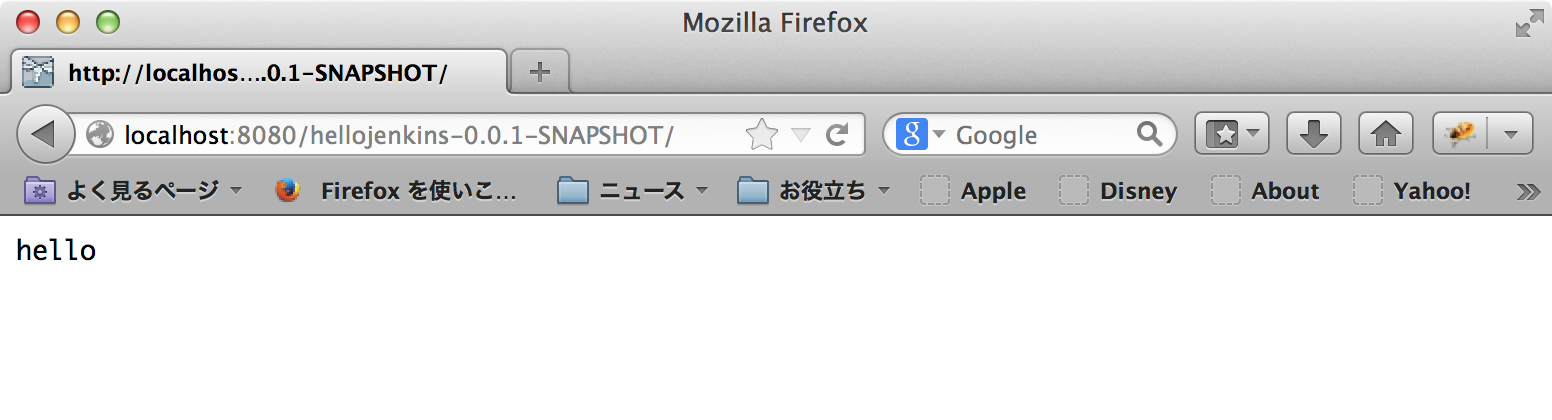
This works too if there's application already deployed which have same name.
Commit to repository
- Commit changes of pom.xml so that Jenkins can execute the goal that tested above.
Make a Jenkins job
- Copy a job that created in previous post
- Edit the job that copied
- Add maven goal “wildfly:deploy”

- Add maven goal “wildfly:deploy”
- Click “保存” in the bottom of the page
Run the job
- I got some errors.
[INFO] XNIO version 3.2.0.Final
[INFO] XNIO NIO Implementation Version 3.2.0.Final
[INFO] JBoss Remoting version 4.0.0.Final
Authenticating against security realm: ManagementRealm
[ERROR] JBREM000200: Remote connection failed: javax.security.sasl.SaslException: Authentication failed: the server presented no authentication mechanisms
[INFO] ------------------------------------------------------------------------
[INFO] BUILD FAILURE
[INFO] ------------------------------------------------------------------------
[INFO] Total time: 48.038s
[INFO] Finished at: Sat Feb 22 13:44:10 JST 2014
[INFO] Final Memory: 20M/249M
[INFO] ------------------------------------------------------------------------
Jenkins????????????????
[ERROR] Failed to execute goal org.wildfly.plugins:wildfly-maven-plugin:1.0.1.Final:deploy (default-cli) on project hellojenkins: Could not execute goal deploy on /Users/Shared/Jenkins/Home/jobs/DeployToWildFly/workspace/hellojenkins/target/hellojenkins-0.0.1-SNAPSHOT.war. Reason: I/O Error could not execute operation '{
[ERROR] "operation" => "read-attribute",
[ERROR] "address" => [],
[ERROR] "name" => "launch-type"
[ERROR] }': java.net.ConnectException: JBAS012174: Could not connect to http-remoting://127.0.0.1:9990. The connection failed: Authentication failed: the server presented no authentication mechanisms
[JENKINS] Archiving /Users/Shared/Jenkins/Home/jobs/DeployToWildFly/workspace/hellojenkins/pom.xml to org.nailedtothex/hellojenkins/0.0.1-SNAPSHOT/hellojenkins-0.0.1-SNAPSHOT.pom
[ERROR] -> [Help 1]
[ERROR]
[ERROR] To see the full stack trace of the errors, re-run Maven with the -e switch.
[ERROR] Re-run Maven using the -X switch to enable full debug logging.
[ERROR]
[ERROR] For more information about the errors and possible solutions, please read the following articles:
[ERROR] [Help 1] http://cwiki.apache.org/confluence/display/MAVEN/MojoExecutionException
channel stopped
成果物を保存中
Finished: FAILURE
Why error?
- In this setup, Jenkins and WildFly are running in different users
- According to [7], there's an authentication mechanism called “JBoss Local User”, and maybe it can be used with same machine and user, and we might have been used it
- But Jenkins has its own user in this setup
- So, we may need another authentication mechanism.
Add a management user to WildFly
- According to [7], properties file based authentication is enabled by default
- We can use that command named “add-user” in $WILDFLY_HOME/bin to add a pair of username and password to properties file. usage:
./add-user.sh [USERNAME] [PASSWORD]
- So let's make it one:
kyle-no-MacBook:bin kyle$ ./add-user.sh admin ***
Picked up _JAVA_OPTIONS: -Dfile.encoding=UTF-8
Added user 'admin' to file '/Users/kyle/apps/wildfly-8.0.0.Final/standalone/configuration/mgmt-users.properties'
Added user 'admin' to file '/Users/kyle/apps/wildfly-8.0.0.Final/domain/configuration/mgmt-users.properties'
kyle-no-MacBook:bin kyle$
- Restart of WildFly is not mandatory.
Edit and commit pom.xml
- We have to add configuration element as a child of plugin element
                <configuration>
                    <username>USERNAME</username>
                    <password>PASSWORD</password>
                </configuration>
- Now it is:
<project xmlns="http://maven.apache.org/POM/4.0.0" xmlns:xsi="http://www.w3.org/2001/XMLSchema-instance"
    xsi:schemaLocation="http://maven.apache.org/POM/4.0.0 http://maven.apache.org/xsd/maven-4.0.0.xsd">
    <modelVersion>4.0.0</modelVersion>
    <groupId>org.nailedtothex</groupId>
    <artifactId>hellojenkins</artifactId>
    <version>0.0.1-SNAPSHOT</version>
    <packaging>war</packaging>
    <dependencies>
        <dependency>
            <groupId>javax</groupId>
            <artifactId>javaee-api</artifactId>
            <version>7.0</version>
            <scope>provided</scope>
        </dependency>
        <dependency>
            <groupId>junit</groupId>
            <artifactId>junit</artifactId>
            <version>4.11</version>
            <scope>test</scope>
        </dependency>
    </dependencies>
    <properties>
        <maven.compiler.source>1.7</maven.compiler.source>
        <maven.compiler.target>1.7</maven.compiler.target>
        <failOnMissingWebXml>false</failOnMissingWebXml>
    </properties>
    <build>
        <plugins>
            <plugin>
                <groupId>org.wildfly.plugins</groupId>
                <artifactId>wildfly-maven-plugin</artifactId>
                <version>1.0.1.Final</version>
                <configuration>
                    <username>USERNAME</username>
                    <password>PASSWORD</password>
                </configuration>
            </plugin>
        </plugins>
    </build>
</project>
- After edit, we have to commit it again.
- I guess it is not good to write that environment specific variables like username and password in pom.xml, but I couldn't be found other better idea, so I just go this way this time.
A way to specify that username and password in the MAVEN_OPTS
- According to [10], entries that wrote “User property is:” are can be specified in the MAVEN_OPTS. like that:

- That configuration can be set after click “Advanced…” in the build section of configuration page of a project.
- Now, we don't need to specify authentication information in pom.xml.
Run the job again
[INFO] --- maven-war-plugin:2.2:war (default-war) @ hellojenkins ---
[INFO] Packaging webapp
[INFO] Assembling webapp [hellojenkins] in [/Users/Shared/Jenkins/Home/jobs/DeployToWildFly/workspace/hellojenkins/target/hellojenkins-0.0.1-SNAPSHOT]
[INFO] Processing war project
[INFO] Webapp assembled in [3 msecs]
[INFO] Building war: /Users/Shared/Jenkins/Home/jobs/DeployToWildFly/workspace/hellojenkins/target/hellojenkins-0.0.1-SNAPSHOT.war
[WARNING] Failed to getClass for org.wildfly.plugin.deployment.DeployMojo
[INFO]
[INFO] <<< wildfly-maven-plugin:1.0.1.Final:deploy (default-cli) @ hellojenkins <<<
[INFO]
[INFO] --- wildfly-maven-plugin:1.0.1.Final:deploy (default-cli) @ hellojenkins ---
[INFO] XNIO version 3.2.0.Final
[INFO] XNIO NIO Implementation Version 3.2.0.Final
[INFO] JBoss Remoting version 4.0.0.Final
Authenticating against security realm: ManagementRealm
[INFO] ------------------------------------------------------------------------
[INFO] BUILD SUCCESS
[INFO] ------------------------------------------------------------------------
[INFO] Total time: 4.672s
[INFO] Finished at: Sat Feb 22 14:37:01 JST 2014
[INFO] Final Memory: 21M/317M
[INFO] ------------------------------------------------------------------------
[JENKINS] Archiving /Users/Shared/Jenkins/Home/jobs/DeployToWildFly/workspace/hellojenkins/pom.xml to org.nailedtothex/hellojenkins/0.0.1-SNAPSHOT/hellojenkins-0.0.1-SNAPSHOT.pom
channel stopped
成果物を保存中
Finished: SUCCESS
- Succeed but weird warning “Failed to getClass for org.wildfly.plugin.deployment.DeployMojo” remained.
- I have googled it but there's no information about it.
Remarks
- Maybe a way introduced at [8] can be a good idea to achieve that switch various deployment destinations.
- We can switch the destination easily through use of Maven profiles
- If you don't want to deploy when test failed, follow steps in [9] , and set parameter “-Dmaven.test.failure.ignore=false” to the MAVEN_OPTS.
- When we have to deploy to remote Unix systems, Publish Over SSH Plugin[11] sounds very useful than the procedure of this post.
References
- WildFly Maven Plugin - Deploy/Undeploy Examples
- Eclipse Community Forums: Hudson » Deploy to Wildfly (jBoss 8.x?)
- The 10 Most Important Projects Hosted On Codehaus.org
- Deploy Plugin - Jenkins - Jenkins Wiki
- JenkinsでJBossAS7にデプロイしようと思ったので - 日々常々
- WildFly Maven Plugin - Deploy/Undeploy Examples
- Security Realms - WildFly 8 - Project Documentation Editor
- Jboss / Wildfly maven plugin to deploy on localhost/remote server
- [#JENKINS-959] hudson deploys maven artifact even if test has failed - Jenkins JIRA
- WildFly Maven Plugin - wildfly:deploy
- Publish Over SSH Plugin - Jenkins - Jenkins Wiki
How to specify a Git tag to be processed with Jenkins
TweetPosted on Friday Feb 21, 2014 at 08:35PM in Jenkins
Environment
- Jenkins 1.551
- Apache Maven 3.1.1
- git version 1.8.3.4 (Apple Git-47)
- Eclipse Kepler SR1
- Oracle JDK7u51
- OS X 10.9.1
Create a tag
Open context menu of the project - Team - Advanced - Tag
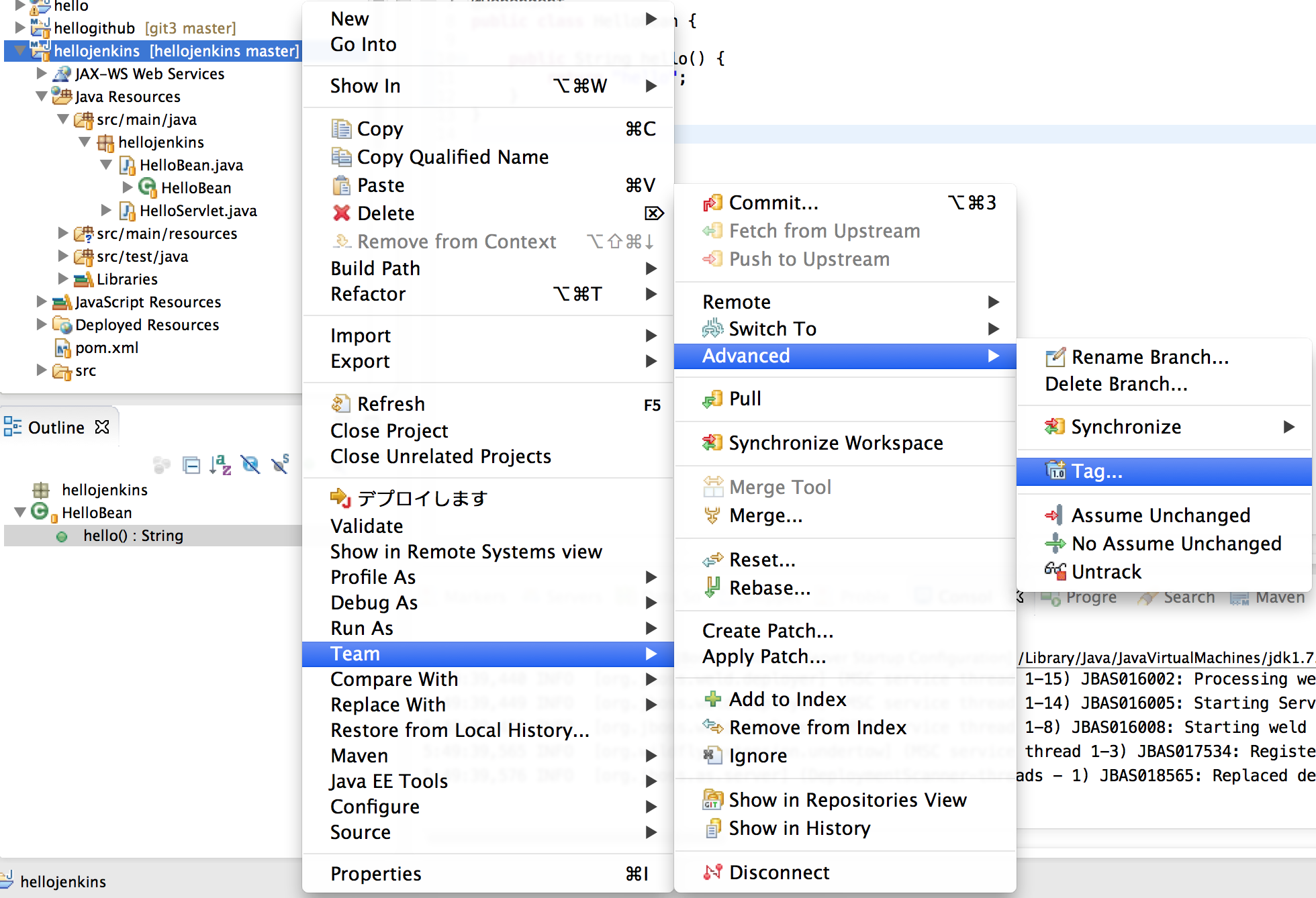
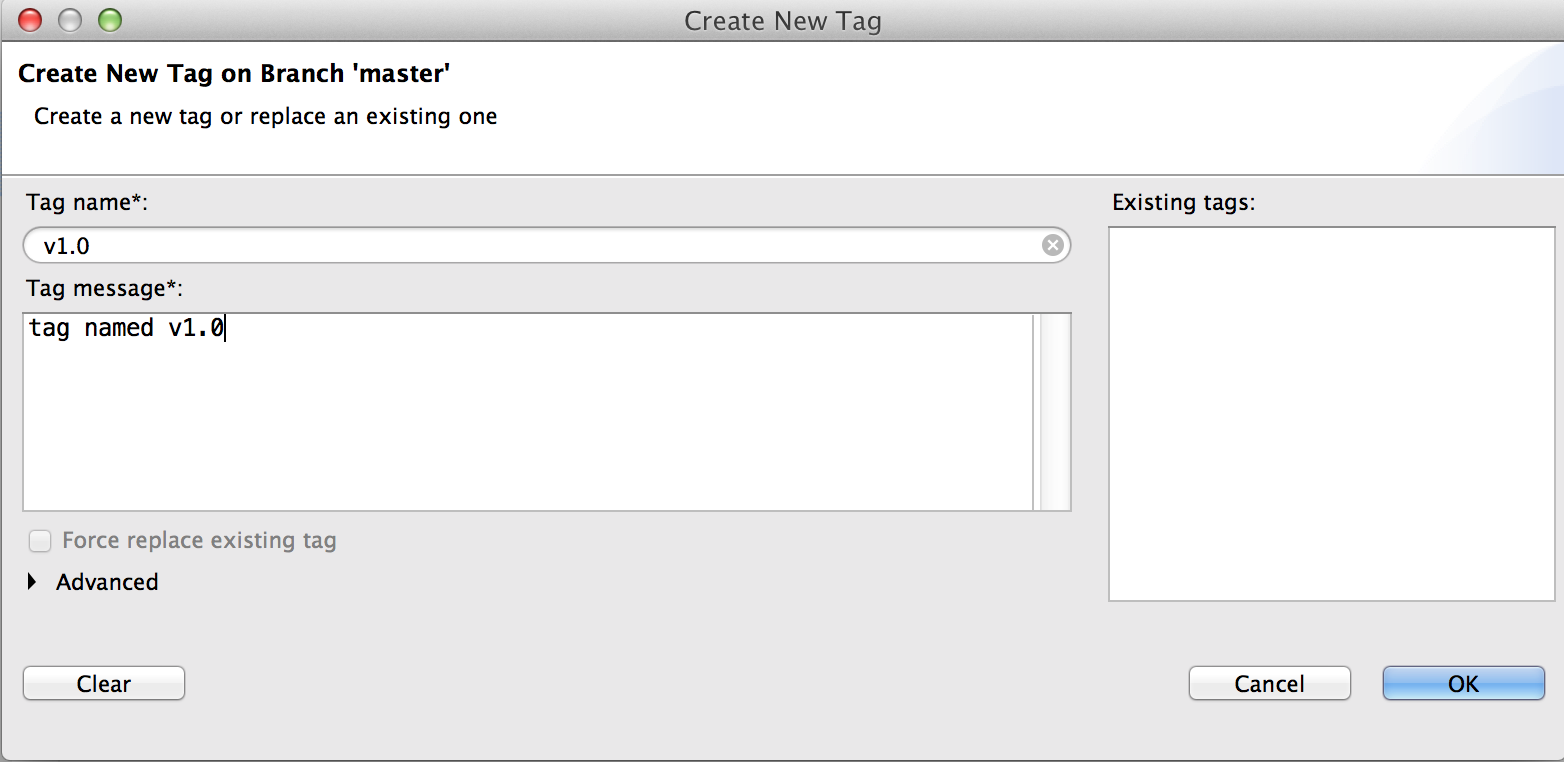
Enter tag name and Tag message, then click OK
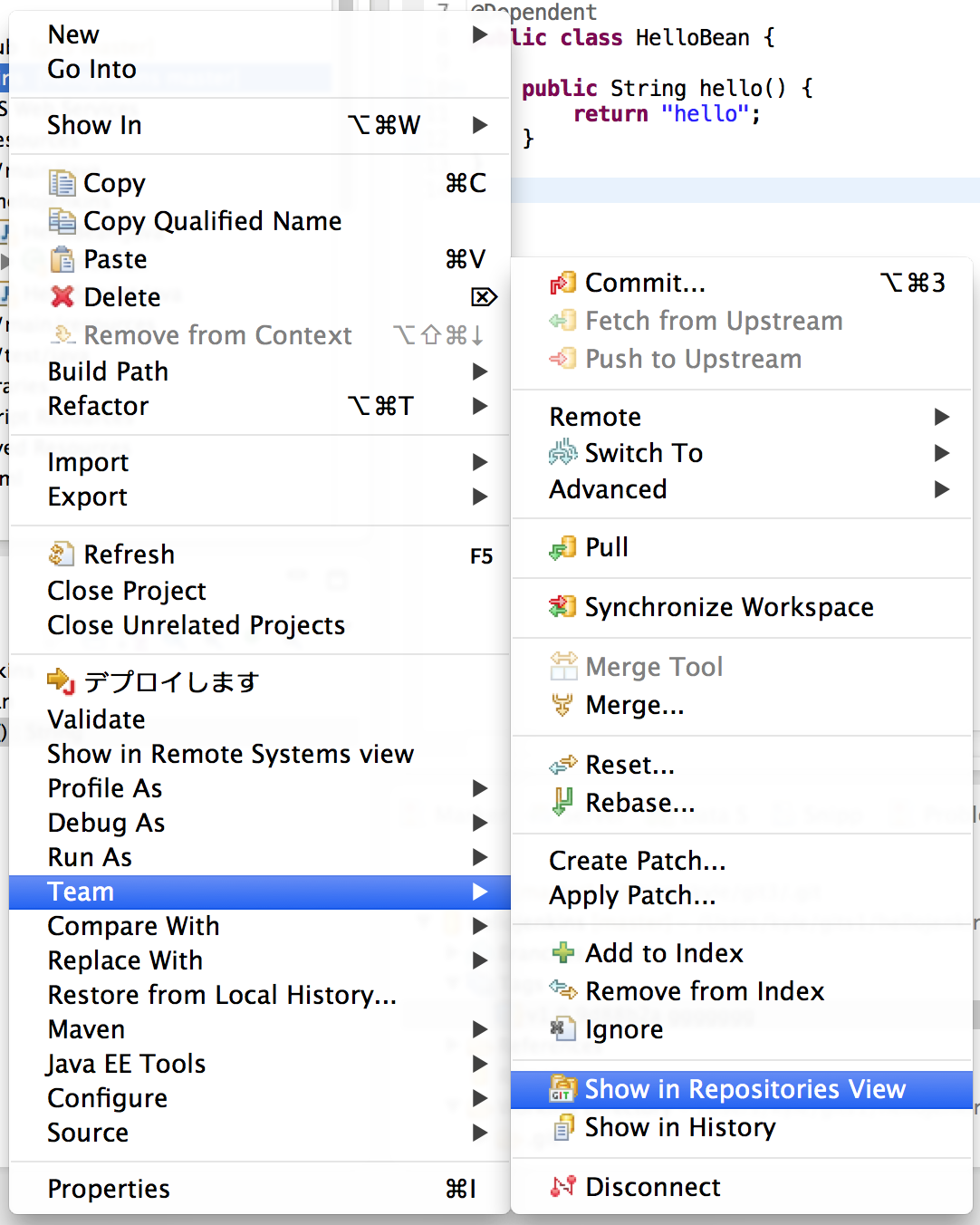
To check created tag, Open context menu of the project - Team - Show in Repositories View
Confirm it appeared.
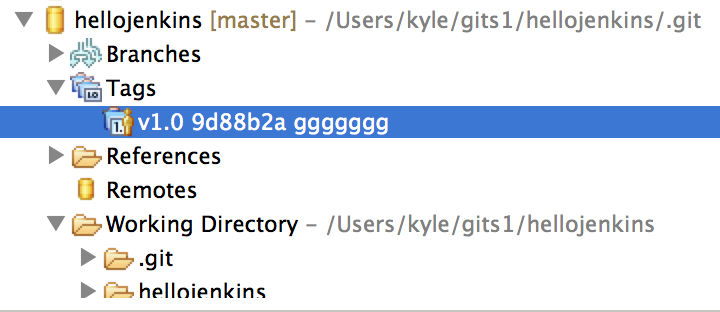
Modify a resource of HEAD
- In order to check that build will processed with the tag specified, so just do some modify a resource of HEAD.
- Make sure that you are in the master branch.
- Procedure to switch: Team - Switch To - master
- I have modified a resource that returns a message to Servlet. now it shows like that:
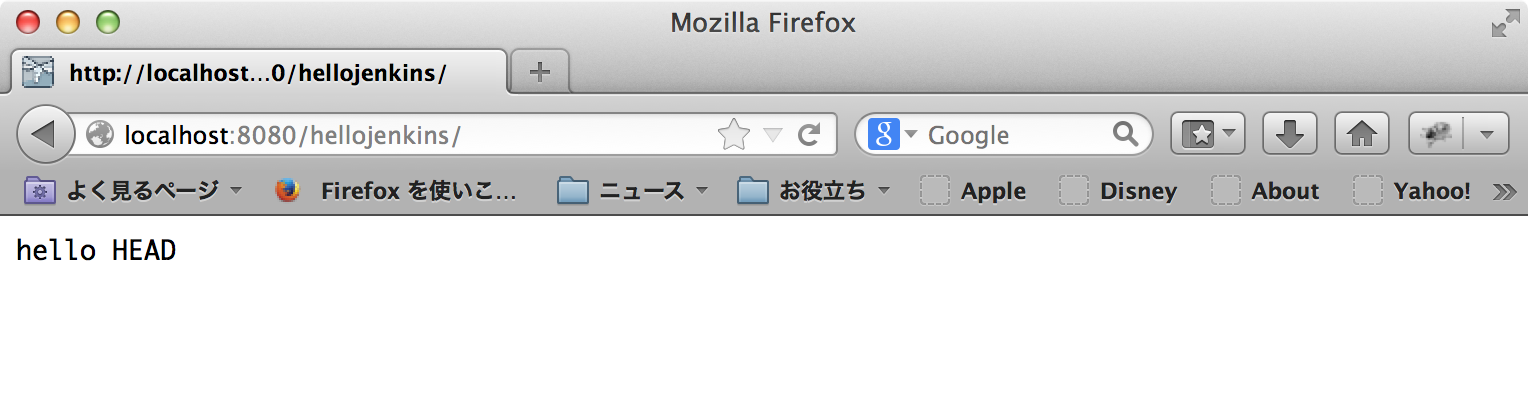
- After modify, we have to commit it.
Install Git Parameter Plugin
I got trouble that the plugin not showing any tags, so I have stopped using this plugin. there are some people who reporting same problem[6]. If skipped this, we can't see the list of tags in the repository, but we can specify a tag manually.
This plugin makes easy that specify a tag to be processed.
Make a Jenkins job
- Copy a job that created in previous post
- Check “This build is parameterized”
- Click “Add Parameter”
- Click “Git Parameter”
- Enter “tag” to “Name”
- Enter “*/master” to “Branch”
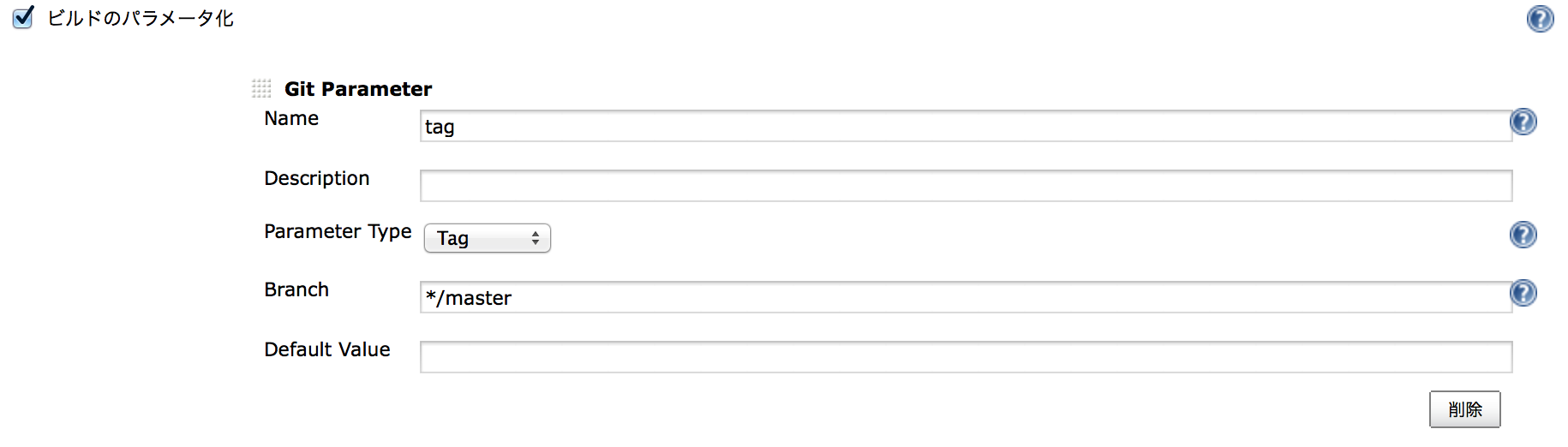
- Find the section named “Source Code Management”
- Enter “${tag}” to “Branch Specifier”
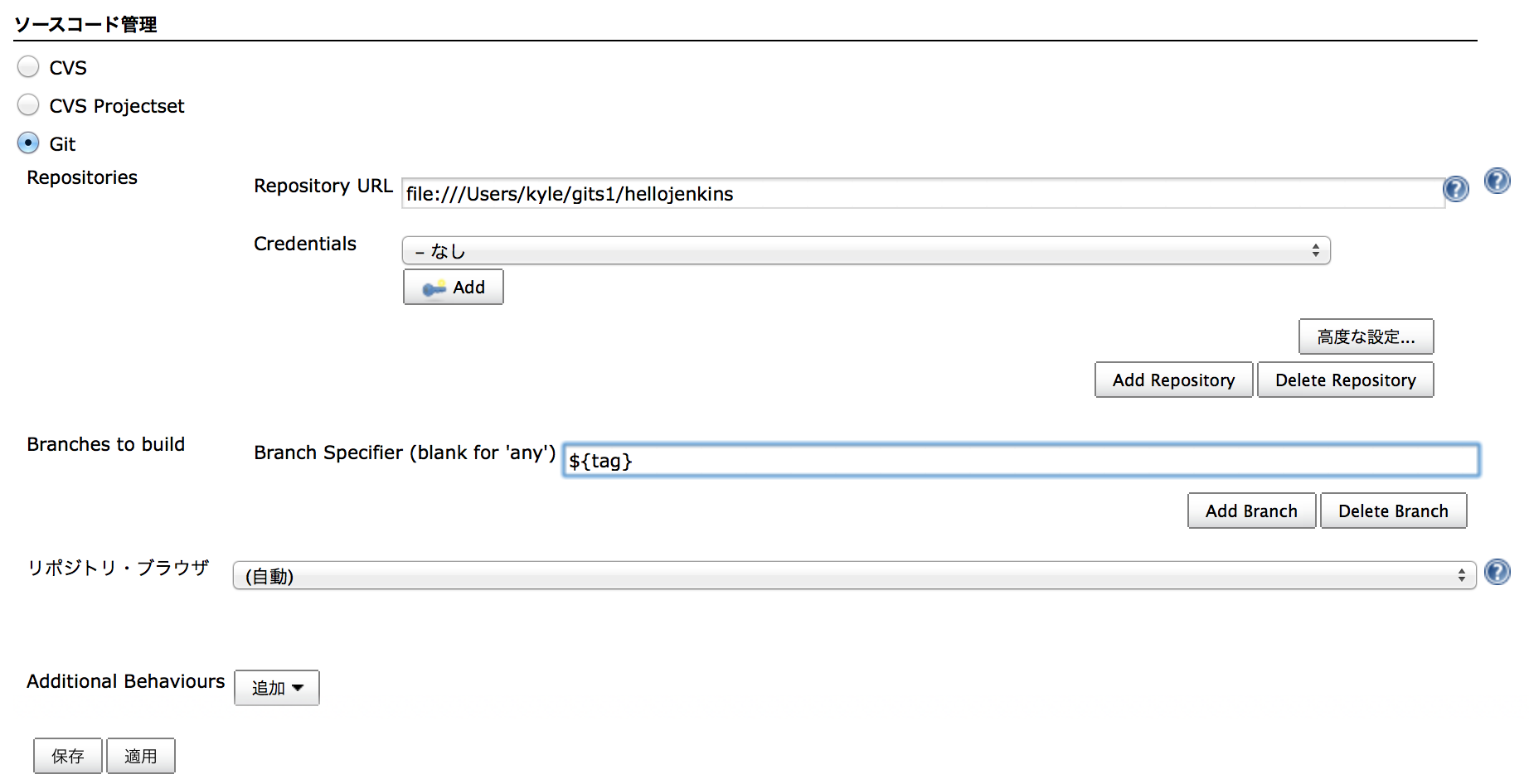
- Click “Save”
Try Parameterized build
- Click this:

- Select a tag that created above
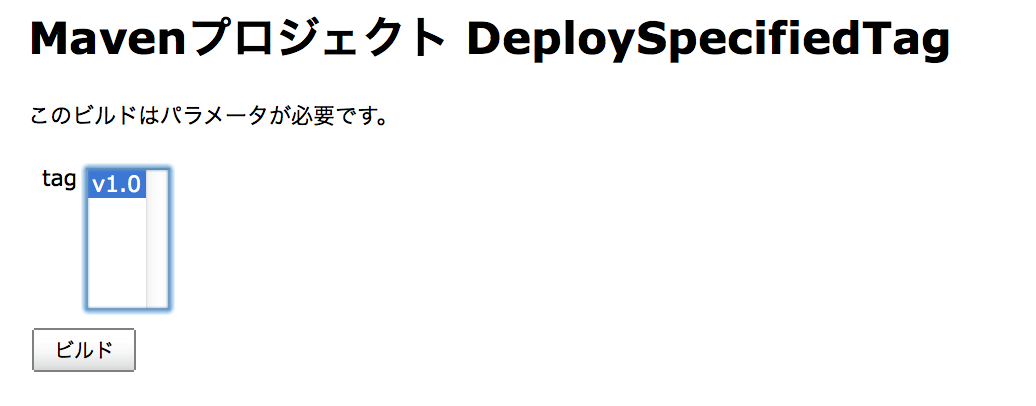
- Click “ビルド”
Check console output of Jenkins
ユーザーanonymousが実行
ビルドします。 ワークスペース: /Users/Shared/Jenkins/Home/jobs/DeploySpecifiedTag/workspace
Fetching changes from the remote Git repository
Fetching upstream changes from file:///Users/kyle/gits1/hellojenkins
Checking out Revision 9d88b2abe381c6e2c915bbbf0ddeec09119b6f04 (v1.0)
Parsing POMs
...
- We can see that build was processed with tag named “v1.0”
References
- Can I get Jenkins to build a git tag from a passed in parameter? - Stack Overflow
- Jenkins and the Git Branch Selection - Sourceprojects.org
- Git Parameter Plugin - Jenkins - Jenkins Wiki
- Jenkinsで外部パラメータで与えたブランチを対象にビルドできるようにしておくと凄惨性あがって墓ドル - ( ꒪⌓꒪) ゆるよろ日記
- Hudson Growl Pluginでビルド結果をGrowlへ通知 | skmks
- Doesn't show any tags or revisions · Issue #2 · lukanus/git-parameter
Tags: jenkins
How to make git commit to trigger run a Jenkins job
TweetPosted on Friday Feb 21, 2014 at 06:02PM in Technology
Environment
- Jenkins 1.551
- git version 1.8.3.4 (Apple Git-47)
- OS X 10.9.1
Try using curl
- In this setup, there is no authentication at Jenkins.
curl -X POST http://localhost:18080/job/BuildAndTestHead/build
- Let's try with dump-header option.
kyle-no-MacBook:Jenkins kyle$ curl -D - -X POST http://localhost:18080/job/BuildAndTestHead/build
HTTP/1.1 201 Created
Location: http://localhost:18080/queue/item/4/
Content-Length: 0
Server: Jetty(8.y.z-SNAPSHOT)

kyle-no-MacBook:Jenkins kyle$
Configure a hook of repository
- Create a file named “post-commit” in .git/hooks directory.
kyle-no-MacBook:hooks kyle$ pwd
/Users/kyle/gits1/hellojenkins/.git/hooks
kyle-no-MacBook:hooks kyle$ ls -l
total 8
-rwxr-xr-x+ 1 kyle  staff  73  2 23 10:50 post-commit
kyle-no-MacBook:hooks kyle$ cat post-commit
#!/bin/sh
curl -X POST http://localhost:18080/job/BuildAndTestHead/build
kyle-no-MacBook:hooks kyle$
- Now it runs automatically when we commit using git command from cli.
Remarks
- According to [3], It doesn't work when we commit with Eclipse.
- So, we might have to config Jenkins to poll the repository periodically.
References
Tags: jenkins
How to install, git clone, build and test
TweetPosted on Thursday Feb 20, 2014 at 06:01PM in Technology
Just try to make Jenkins work, and do some typical works (git clone, build, test) with Git and Maven.
Environment
- Jenkins 1.551
- Apache Maven 3.1.1
- git version 1.8.3.4 (Apple Git-47)
- Oracle JDK7u51
- OS X 10.9.1
Download and Install
- OS X Native package is available at [1].
- The package is a pkg file.
- Install is easy. we can just open the package and follow instructions.
- When installation finishes, Jenkins will run automatically at port 8080 and browser will open and going to show localhost:8080, so we have to stop any application servers ran at port 8080 before we start installation.
- If you missed that point, Jenkins will run automatically after you have stop the application server.
- Followed this instruction, Jenkins will be installed as a service of OS X so it will be launched every time at system boot.
Configuration of platform specific matters
Change ports of Jenkins
- I have been used port 8080 for application server, so I don't want to give it to Jenkins.
- According to [3], this will make Jenkins to use other ports on OS X.
sudo defaults write /Library/Preferences/org.jenkins-ci httpPort 18080
sudo defaults write /Library/Preferences/org.jenkins-ci ajp13Port 18009
Avoid garbled characters for Multi-byte environment
- This is for Japanese OS X environment
- Add this line to “/Library/Application Support/Jenkins/jenkins-runner.sh”
export LANG=ja_JP.UTF-8
Use English as UI Language
- As default, Jenkins use browser's language for UI.
- Locale Plugin[7] allows to specify language.
- I prefer English at Jenkins so I have installed it.
- After plugin installed, go to Configure System
- Enter “ENGLISH” to Default Language
- Check “Ignore browser preference and force this language to all users”

- Click “Save” in the bottom of the page
Restart Jenkins
- To affect these changes, we have to restart Jenkins.
sudo launchctl stop org.jenkins-ci
sudo launchctl start org.jenkins-ci
- Now we got to run Jenkins at 18080 port.
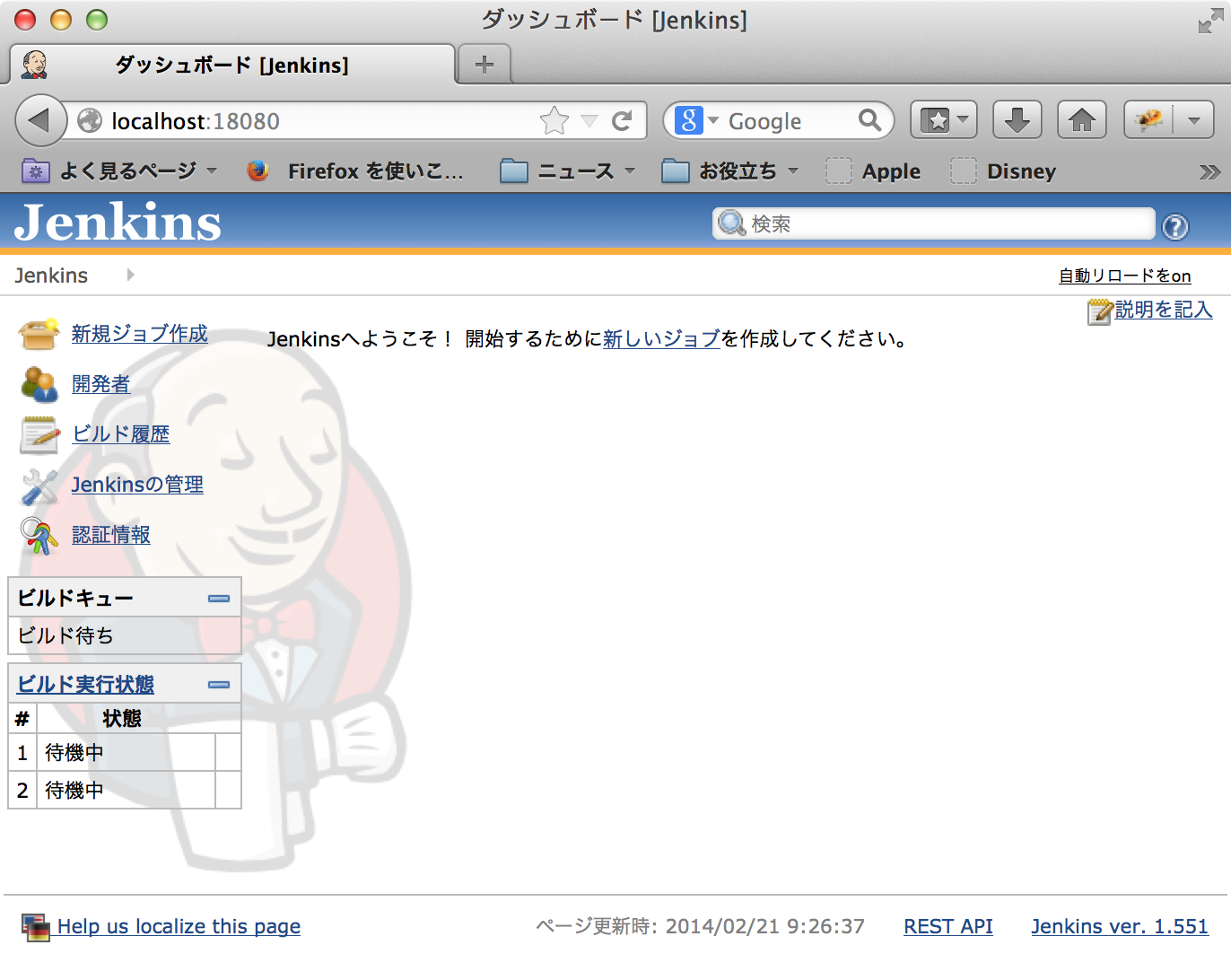
Configuration
Make sure that “git” and “mvn” command are installed
kyle-no-MacBook:~ kyle$ which git
/usr/bin/git
kyle-no-MacBook:~ kyle$ git --version
git version 1.8.3.4 (Apple Git-47)
kyle-no-MacBook:~ kyle$ which mvn
/Users/kyle/apps/apache-maven-3.1.1/bin/mvn
kyle-no-MacBook:~ kyle$ mvn --version
Picked up _JAVA_OPTIONS: -Dfile.encoding=UTF-8
Apache Maven 3.1.1 (0728685237757ffbf44136acec0402957f723d9a; 2013-09-18 00:22:22+0900)
Maven home: /Users/kyle/apps/apache-maven-3.1.1
Java version: 1.7.0_51, vendor: Oracle Corporation
Java home: /Library/Java/JavaVirtualMachines/jdk1.7.0_51.jdk/Contents/Home/jre
Default locale: ja_JP, platform encoding: UTF-8
OS name: "mac os x", version: "10.9.1", arch: "x86_64", family: "mac"
kyle-no-MacBook:~ kyle$
Install the Git Plugin of Jenkins
- Open the Jenkins page.
- Click “Jenkinsの管理” (in Japanese messages)
- Click “プラグインの管理”
- Click “利用可能”
- Enter “git plugin” to filter field.
- Check “Git Plugin”

- Click “ダウンロードして再起動後にインストール”
- Installation progress page will be shown.
- It seems to a static page at first, but it updates on the progress for dynamically so just wait for a while.
- It takes several minutes for complete.
- Confirm all processes are completed
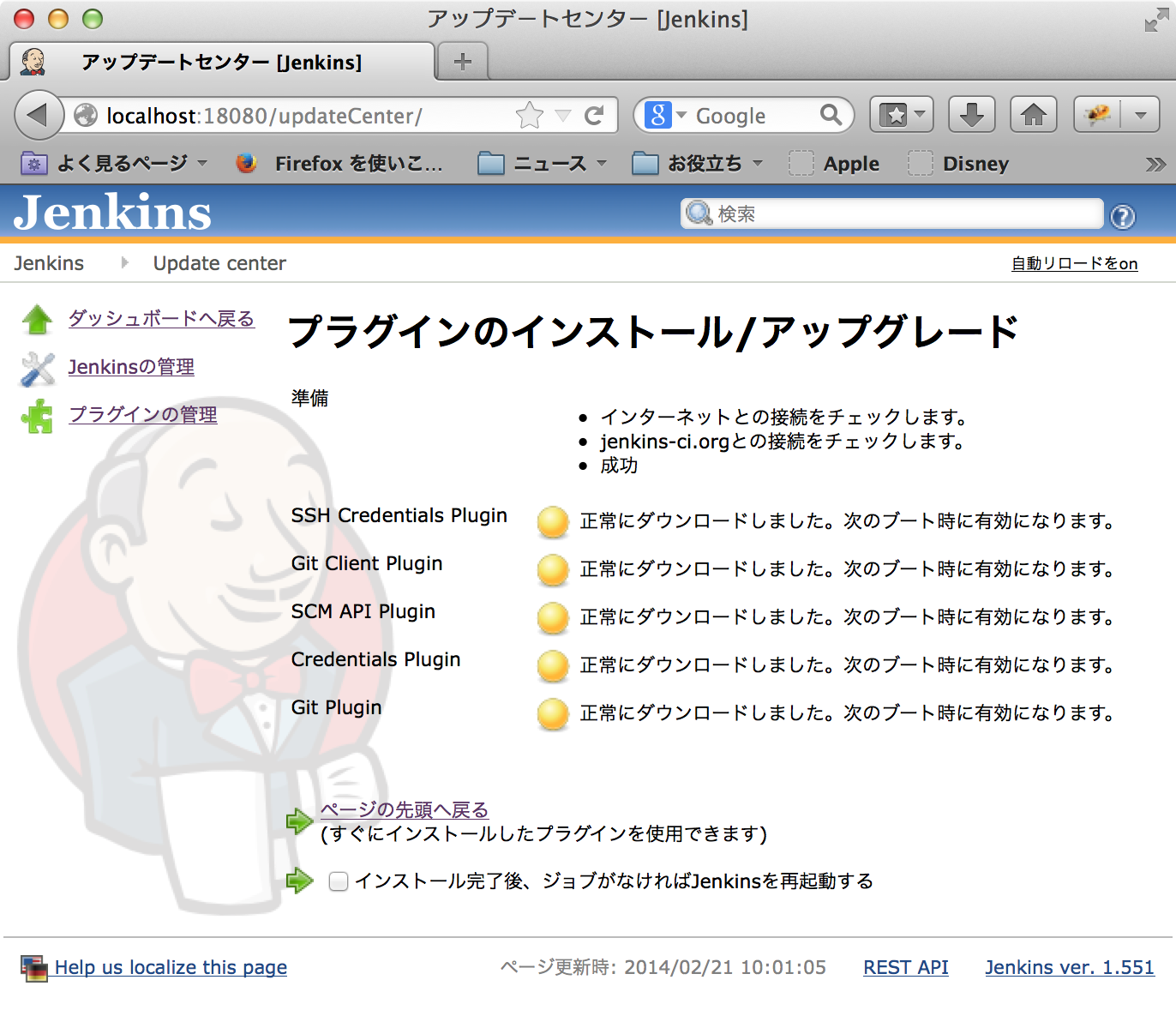
- Restart the Jenkins.
Set JAVA_HOME
- Output of this command would be help for OS X users.
kyle-no-MacBook:~ kyle$ /usr/libexec/java_home -V
Matching Java Virtual Machines (3):
    1.7.0_51, x86_64:   "Java SE 7" /Library/Java/JavaVirtualMachines/jdk1.7.0_51.jdk/Contents/Home
    1.6.0_65-b14-462, x86_64:   "Java SE 6" /System/Library/Java/JavaVirtualMachines/1.6.0.jdk/Contents/Home
    1.6.0_65-b14-462, i386: "Java SE 6" /System/Library/Java/JavaVirtualMachines/1.6.0.jdk/Contents/Home

/Library/Java/JavaVirtualMachines/jdk1.7.0_51.jdk/Contents/Home
kyle-no-MacBook:~ kyle$
- Click “Jenkinsの管理”
- Click “システムの設定”
- Find JDK section.
- Click “JDK追加”
- Uncheck “自動インストール”
- Enter “名前”
- Enter “JAVA_HOME”
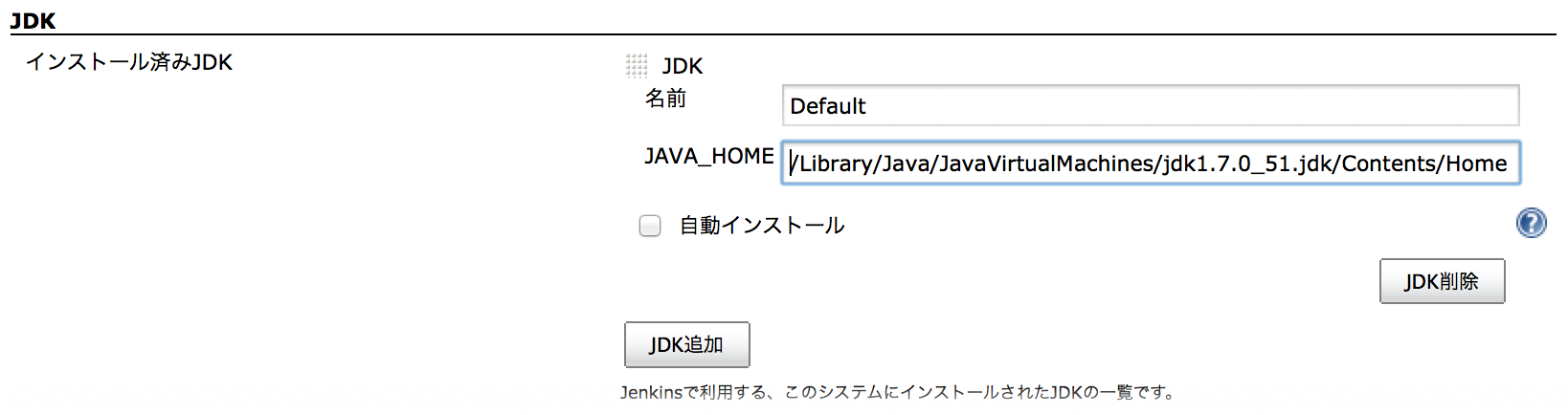
- Click “保存” at the bottom of the page.
Set Path to Maven executable
- Click “Jenkinsの管理”
- Click “システムの設定”
- Find Maven section.
- Click “Maven追加”
- Uncheck “自動インストール”
- Enter MAVEN_HOME
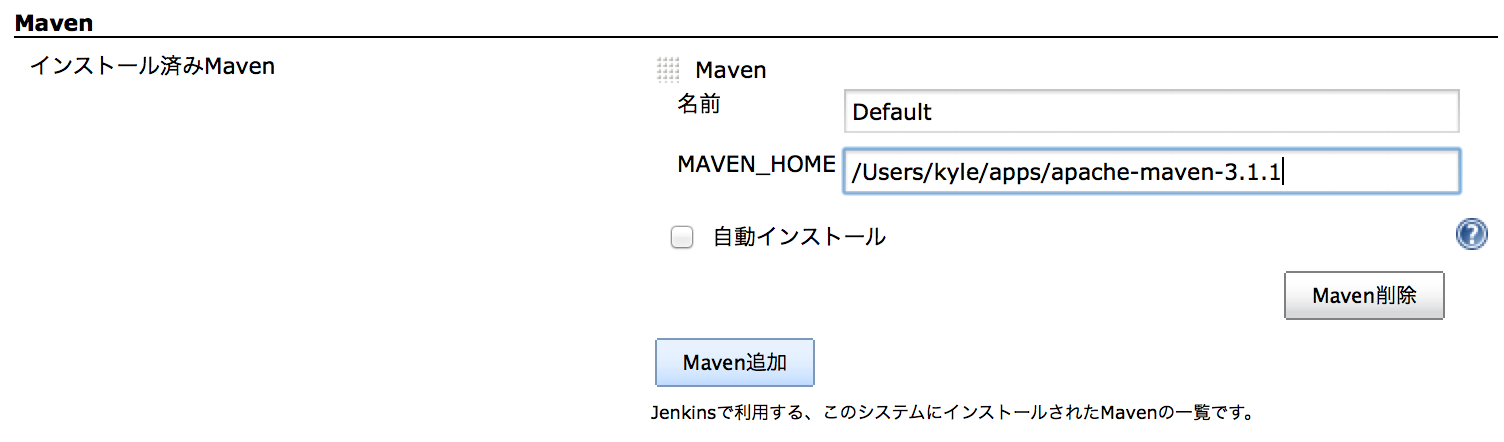
- Click “保存” at the bottom of the page.
Make a job
- At first, we assume that a example maven project is committed to a local repository. it is better if the project contains some JUnit test classes. I have created a project which contains a servlet, a CDI managed bean and a test class for it.
- This job will do:
- Retrieve the source tree of a maven project from the Git repository in local filesystem
- Build a WAR file
- Run JUnit test
Procedures:
- Click “新規ジョブ作成”
- Enter “MyJob001” to “ジョブ名”
- Check “Maven2/3プロジェクトのビルド”
- Click “OK”
- Find “ソースコード管理” section.
- Check “Git”
- Enter “Repository URL”
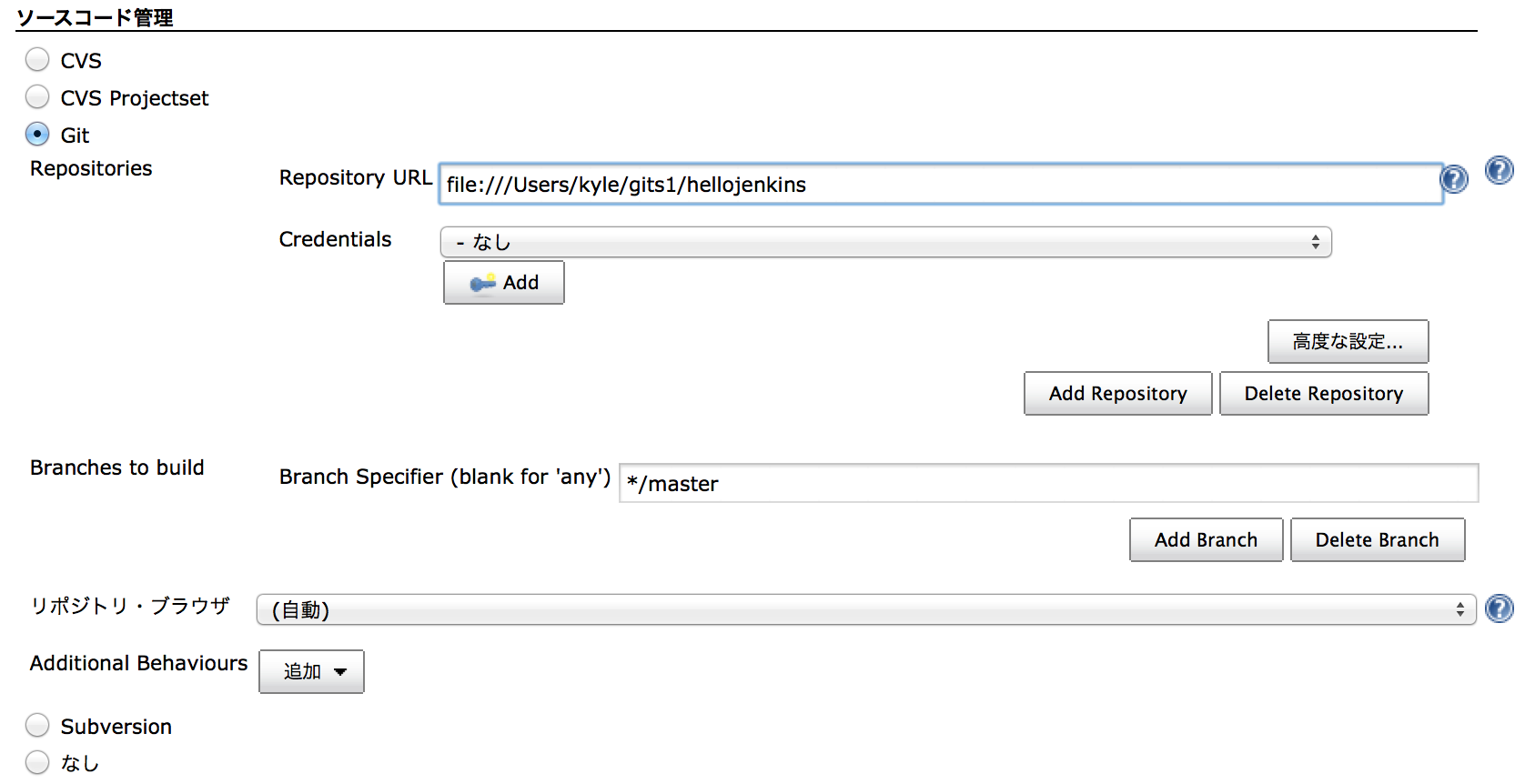
- Find “ビルド” Section
- Enter “ルートPOM'
- Enter “ゴールとオプション”

- Find “ビルド後の処理” Section
- Click “ビルド後の処理の追加”
- Click “成果物を保存”
- Enter “保存するファイル”

- Click “保存”
- Now I got a job “MyJob001”
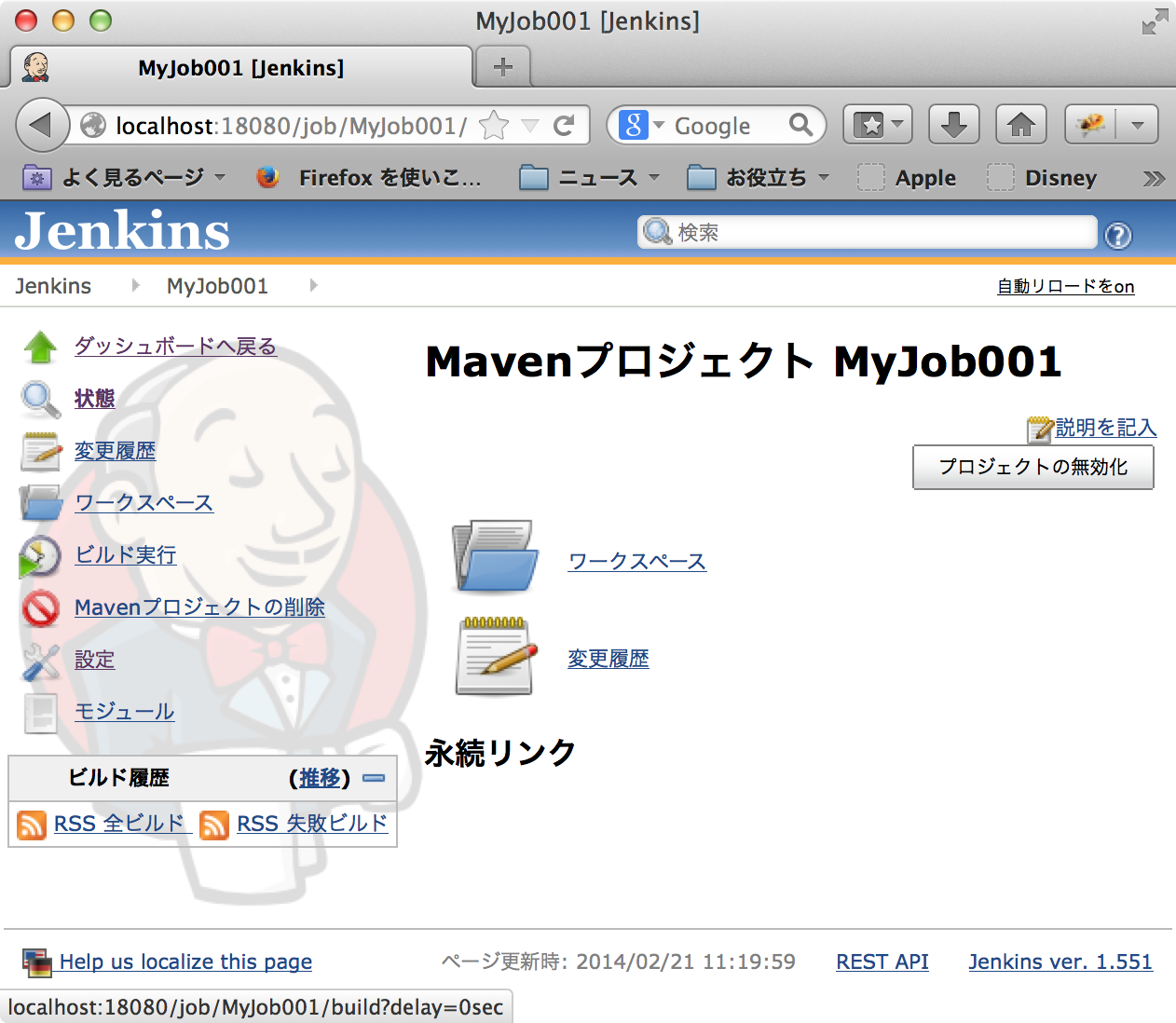
Build
- Open the job “MyJob001”
- Click “ビルド実行”
- Wait for a while.
- It takes really long time for the first time because there are many new dependencies. maybe we should check the console output of Jenkins.
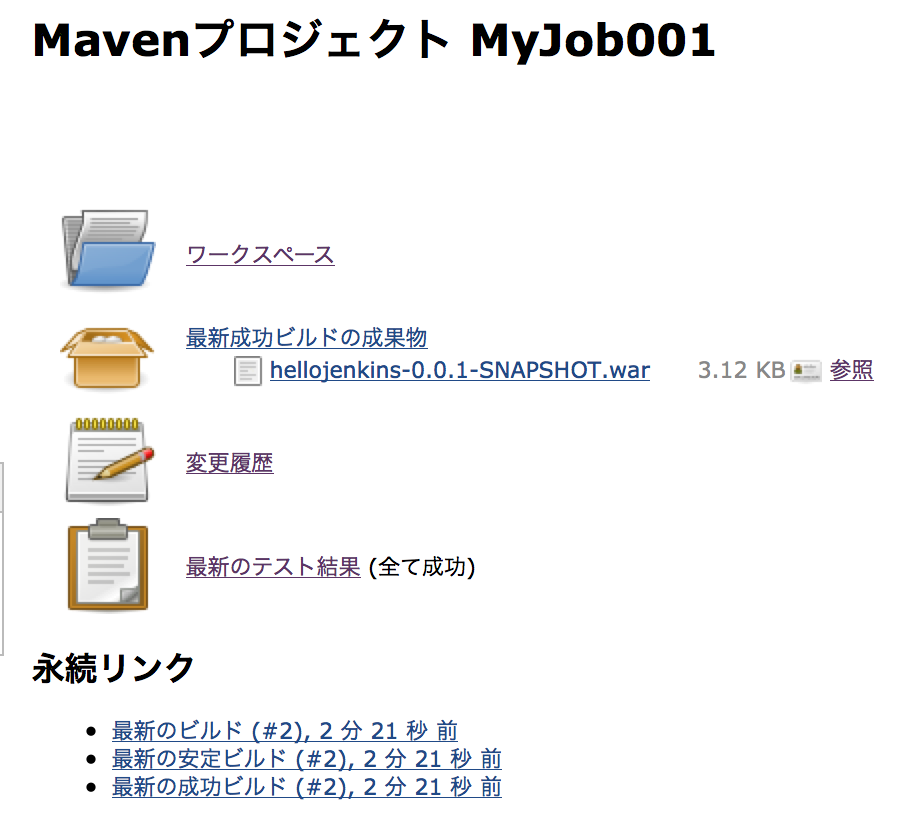
- Some minutes later, we got to see fine mark in the dashboard.

- Detail page is interesting, we can see that all tests are passed and deliverables at once.
- Check the WAR file which have built by Jenkins.
kyle-no-MacBook:hellojenkins kyle$ unzip -l /Users/Shared/Jenkins/Home/jobs/MyJob001/lastSuccessful/org.nailedtothex\$hellojenkins/archive/org.nailedtothex/hellojenkins/0.0.1-SNAPSHOT/hellojenkins-0.0.1-SNAPSHOT.war
Archive:  /Users/Shared/Jenkins/Home/jobs/MyJob001/lastSuccessful/org.nailedtothex$hellojenkins/archive/org.nailedtothex/hellojenkins/0.0.1-SNAPSHOT/hellojenkins-0.0.1-SNAPSHOT.war
  Length     Date   Time    Name
 --------    ----   ----    ----
        0  02-21-14 11:24   META-INF/
      132  02-21-14 11:24   META-INF/MANIFEST.MF
        0  02-21-14 11:24   WEB-INF/
        0  02-21-14 11:24   WEB-INF/classes/
        0  02-21-14 11:24   WEB-INF/classes/hellojenkins/
      477  02-21-14 11:24   WEB-INF/classes/hellojenkins/HelloBean.class
     1169  02-21-14 11:24   WEB-INF/classes/hellojenkins/HelloServlet.class
        0  02-21-14 11:24   META-INF/maven/
        0  02-21-14 11:24   META-INF/maven/org.nailedtothex/
        0  02-21-14 11:24   META-INF/maven/org.nailedtothex/hellojenkins/
     1053  02-21-14 11:21   META-INF/maven/org.nailedtothex/hellojenkins/pom.xml
      122  02-21-14 11:24   META-INF/maven/org.nailedtothex/hellojenkins/pom.properties
 --------                   -------
     2953                   12 files
kyle-no-MacBook:hellojenkins kyle$
Remarks
- I would also try that other operations such as automated execution or deploy later.
References
- Welcome to Jenkins CI! | Jenkins CI
- Jenkins を Mac で使う | Hazi.tech
- Jenkins Mac OS X InstallerでJenkinsを入れる - IwazerReport
- Jenkins の git plugin と git-client plugin の相性に注意 - diary.sorah
- Git Plugin の導入に躓いた - おこらない日記
- githubとAndroidとJenkinsの素敵な関係 | GeNERACE labo
- Locale Plugin - Jenkins - Jenkins Wiki
- The Locale plugin - Howto
Tags: jenkins


